---
title: Attach PDF Documents to a Current - Unsent Invoice
description: This filter menu displays all current outstanding invoices that have been imported into Apxium and are awaiting to be sent on the next email-sending schedule. This will also allow you to attach a PDF
---
[Skip to content](https://support.apxium.com/knowledge/attach-pdf-documents-to-a-current-unsent-invoice#main-content)
English
Show submenu for translations
![apxium-logo.png\]](https://support.apxium.com/hs-fs/hubfs/Logos/apxium-logo.png?width=144&height=50&name=apxium-logo.png)
Open main navigation
Close main navigation
- English
Show submenu for translations
Hello. How can we help you?
- There are no suggestions because the search field is empty.
1. [Apxium Help Center](https://support.apxium.com/knowledge?hsLang=en)
2. [Apxium Collect](https://support.apxium.com/knowledge/apxium-collect?hsLang=en)
3. [General Features](https://support.apxium.com/knowledge/apxium-collect?hsLang=en#general-features)
# Attach PDF Documents to a Current - Unsent Invoice
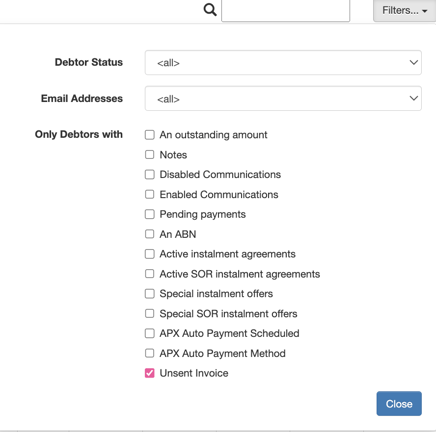
### **Unsent Invoice**
This filter menu displays all current outstanding invoices that have been imported into Apxium and are awaiting to be sent on the next email-sending schedule.
This will also allow you to attach a PDF document to any **current invoice (not overdue) imported into your Apxium dashboard as long as the invoice has not been sent to the client by the system.** As invoices are sent during the night with the main processor run, you can attach the PDF before then as long as the invoice has been picked up by our hourly synchronisation.
On your dashboard, left-click on any debtor you wish to add a PDF document to and select **"Attached PDF to Invoice".**
You may attach multiple PDF documents as needed without a file size limit.
You are able to see all the unsent invoices by going to Filters\> tick Unsent Invoice
**Note:** If there is no email address on file when the invoice is rendered into the Apxium dashboard or the communications are disabled previously, you may still attach so as long as the invoice is still in **current** status.
- [Article Navigation Guide](https://support.apxium.com/knowledge/article-navigation-guide?hsLang=en#main-content)
- [Article Navigation Guide](https://support.apxium.com/knowledge/article-navigation-guide?hsLang=en#article-navigation-guide)
- [Apxium Collect](https://support.apxium.com/knowledge/apxium-collect?hsLang=en#main-content)
- [General Features](https://support.apxium.com/knowledge/apxium-collect?hsLang=en#general-features)
- [Communications](https://support.apxium.com/knowledge/apxium-collect?hsLang=en#communications)
- [Client Experience](https://support.apxium.com/knowledge/apxium-collect?hsLang=en#client-experience)
- [Payments, Settlements & Reconciliations](https://support.apxium.com/knowledge/apxium-collect?hsLang=en#payments-settlements-reconciliations)
- [Engagement / Proposals](https://support.apxium.com/knowledge/apxium-collect?hsLang=en#engagement-proposals)
- [APX Auto (Direct Debiting Invoices)](https://support.apxium.com/knowledge/apxium-collect?hsLang=en#apx-auto-direct-debiting-invoices)
- [Instalment Agreements (Non-SOR On Balance Sheet Instalments)](https://support.apxium.com/knowledge/apxium-collect?hsLang=en#instalment-agreements-non-sor-on-balance-sheet-instalments)
- [Professional Fee Funding (SOR) - Funded Instalments](https://support.apxium.com/knowledge/apxium-collect?hsLang=en#professional-fee-funding-sor-funded-instalments)
- [Reports](https://support.apxium.com/knowledge/apxium-collect?hsLang=en#reports)
- [Integrations](https://support.apxium.com/knowledge/apxium-collect?hsLang=en#integrations)
- [Onboarding Articles & Other Helpful Guides](https://support.apxium.com/knowledge/apxium-collect?hsLang=en#onboarding-articles-other-helpful-guides)
- [Apxium Audit Safe](https://support.apxium.com/knowledge/apxium-audit-safe?hsLang=en#main-content)
- [General Features](https://support.apxium.com/knowledge/apxium-audit-safe?hsLang=en#general-features)
- [Creating Offers/Subscriptions](https://support.apxium.com/knowledge/apxium-audit-safe?hsLang=en#creating-offers-subscriptions)
- [Offer Emails and Documentation](https://support.apxium.com/knowledge/apxium-audit-safe?hsLang=en#offer-emails-and-documentation)
- [Accepting / Declining Audit Safe Subscription](https://support.apxium.com/knowledge/apxium-audit-safe?hsLang=en#accepting-declining-audit-safe-subscription)
- [Active Audit Safe Subscriptions](https://support.apxium.com/knowledge/apxium-audit-safe?hsLang=en#active-audit-safe-subscriptions)
- [Audit Safe Renewal / Rollover](https://support.apxium.com/knowledge/apxium-audit-safe?hsLang=en#audit-safe-renewal-rollover)
- [Pricing](https://support.apxium.com/knowledge/apxium-audit-safe?hsLang=en#pricing)
- [Others](https://support.apxium.com/knowledge/apxium-audit-safe?hsLang=en#others)
- [Apxium Pay My Bill](https://support.apxium.com/knowledge/apxium-pay-my-bill?hsLang=en#main-content)
- [Pay My Bill](https://support.apxium.com/knowledge/apxium-pay-my-bill?hsLang=en#pay-my-bill)
- [Payments and Settlements](https://support.apxium.com/knowledge/apxium-pay-my-bill?hsLang=en#payments-and-settlements)
- [Communications](https://support.apxium.com/knowledge/apxium-pay-my-bill?hsLang=en#communications)
- [APX Auto (Direct Debiting Invoices)](https://support.apxium.com/knowledge/apxium-pay-my-bill?hsLang=en#apx-auto-direct-debiting-invoices)
- [Payrix](https://support.apxium.com/knowledge/apxium-pay-my-bill?hsLang=en#payrix)
- [Client POS - Non Integrated \[North America\]](https://support.apxium.com/knowledge/client-pos-non-integrated-north-america?hsLang=en#main-content)
- [Client POS - General Features](https://support.apxium.com/knowledge/client-pos-non-integrated-north-america?hsLang=en#client-pos-general-features)
- [APX Capital - Tax Pay for Introducers](https://support.apxium.com/knowledge/apx-capital-tax-pay-for-introducers?hsLang=en)
- [APX Capital - Tax Pay For Borrowers](https://support.apxium.com/knowledge/apx-capital-tax-pay-for-borrowers?hsLang=en)
[](http://www.apxium.com?hsLang=en)
Copyright © 2025, Apxium HQ
```json
{
"@context" : "https://schema.org",
"@type" : "VideoObject",
"contentUrl" : "https://2371917.fs1.hubspotusercontent-ap1.net/hubfs/2371917/How%20to%20attach%20PDF%20Document%20to%20a%20current%20unsent%20invoice.mp4",
"dateModified" : "2023-03-01T00:31:51.670Z",
"duration" : "PT22S",
"height" : 724,
"name" : "How to attach PDF Document to a current unsent invoice",
"thumbnailUrl" : "https://2371917.fs1.hubspotusercontent-ap1.net/hubfs/2371917/How%20to%20attach%20PDF%20Document%20to%20a%20current%20unsent%20invoice.mp4/medium.jpg",
"uploadDate" : "2023-03-01T00:31:44.557Z",
"width" : 978
}
```