![apxium-logo.png]](https://support.apxium.com/hs-fs/hubfs/Logos/apxium-logo.png?width=144&height=50&name=apxium-logo.png)
Apxium has now integrated with Annature, making multi signing simple and seamless!
With this integration, practices using Apxium can enable multi signing for documents in engagements. All you need is an active Annature account to get started.
This powerful integration streamlines the signing process, ensuring multiple parties can sign quickly, securely, and with ease.
Apxium - Annature Integration
To enable the Annature integration within your Apxium platform, please contact Apxium Support by raising a ticket via the Help button on your dashboard.
Once Apxium confirms the integration is enabled, please proceed with the following steps.
Establishing Annature Connection
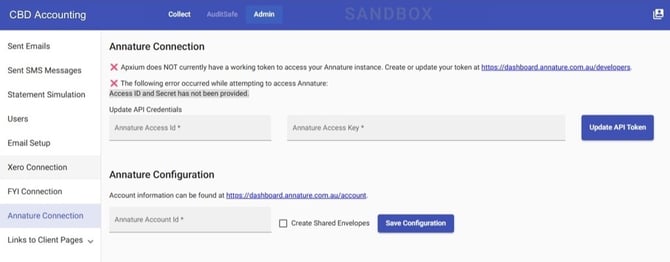
The connection to Annature is done via the Admin > Annature Connection page.
Click on the hyperlink on the page and follow the instructions indicated on this menu.
Editing Client Signing Settings
To edit a client’s signing settings in Annature, go to the Client and click Edit Client Signing Settings.
.jpg?width=670&height=372&name=Works%20(2).jpg)
Tick the Use Annature for Signing
.jpg?width=500&height=418&name=Works%20(3).jpg)
Signing Methods in Engagements: Annature and Apxium
On your Engagement, you can view under the Engagement menu whether the signing method is Annature or via Apxium.
See sample:
.jpg?width=670&height=306&name=Works%20(4).jpg)